Profile & Resume
How Do I Complete My Profile?
A complete profile helps employers find you and lets you use features that need certain sections filled in.
Steps
- Open your profile.
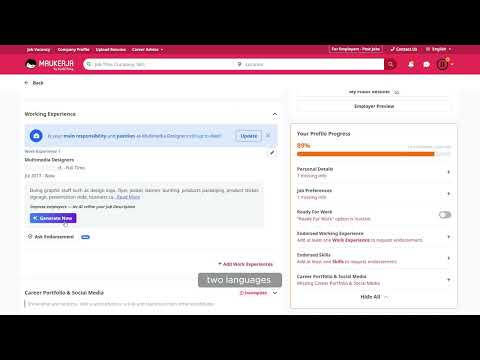
- Look at the Profile Progress panel on the right. It shows a percentage and what is still missing, for example 5 missing info.
- Click the + next to any item to jump straight to it.
- Fill it in and save. The percentage updates as you go.
What the checklist covers
- Profile Photo
- Personal Details
- Working Experience
- Education
- Ready For Work
- Endorsed Working Experience and Endorsed Skills
- Career Portfolio & Social Media
Once Working Experience, Education, Skill & Languages and Job Preferences are complete, Generate Now becomes available and writes an AI About Me introduction for you.